 Renke Holert
7 min read
Import Excel file into Planner Premium
For project managers who have been managing their projects with Microsoft Excel, Microsoft now offers a very simple...

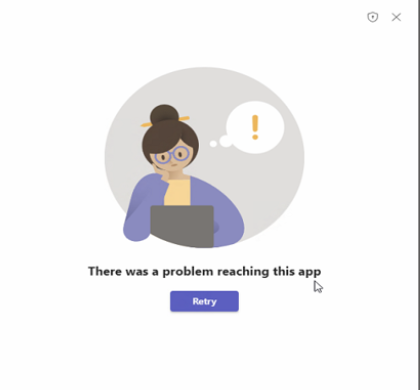
A tab or app won't open in Microsoft Teams and you see the message There was a problem reaching this app. It usually affects Microsoft Lists, Planner, the calendar or custom-built apps. The message names no cause, and that is what makes it tedious: it can be the local client, but it can just as easily be the tenant configuration. This article separates the two — first the steps end users can take, then the points only an administrator can check.
The error usually affects the desktop app only. A typical pattern: a SharePoint list embedded as a tab no longer opens in the Teams desktop app, while access through the Teams web app, the SharePoint web interface, the Microsoft Lists desktop app and the mobile apps continues to work. That pattern is the single most useful clue, because it narrows the cause down to the local client.
If the message also appears in the browser and on a phone, the device is not the problem. In that case it is about permissions, app availability or the network path — all of which an administrator needs to resolve.
Before changing anything, run the cross-check: open the same app at teams.cloud.microsoft in a browser. If it works there, the cause is local and the steps below apply. If the message appears in the browser too, skip the client entirely and go straight to the admin section of this article. That one minute saves most of the unnecessary reinstalls we see in practice.
The cache is the most common local cause. What matters is the changed location: the classic Teams client reached end of availability on 1 July 2025, and the widely quoted path %AppData%\Microsoft\Teams no longer exists in the current client. Microsoft documents two methods for the new client.
Option 1 — reset the app. In Windows Settings, go to Apps > Installed apps, find Microsoft Teams, open More options (…) > Advanced options and select Reset in the Reset section. This deletes the app data, including any local personalisation settings.
Option 2 — delete the cache files. Quit Teams from the taskbar icon, press Windows key + R to open the Run dialog, enter the path %userprofile%\appdata\local\Packages\MSTeams_8wekyb3d8bbwe\LocalCache\Microsoft\MSTeams and delete all files and folders in it. On macOS the equivalents are the containers ~/Library/Group Containers/UBF8T346G9.com.microsoft.teams and ~/Library/Containers/com.microsoft.teams2.
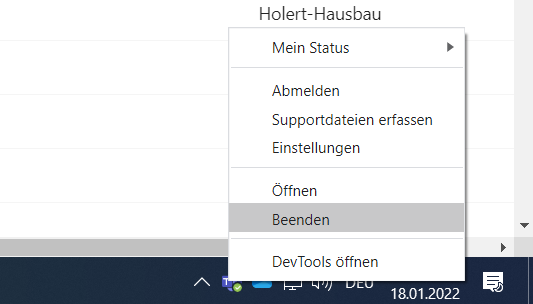
Then restart Teams. The first launch takes longer than usual because the cache files have to be rebuilt. In most cases the tab is reachable again afterwards.
Note: the screenshots still show the classic client interface. The steps described apply to the current Teams client.
A Teams tab is only ever a window onto something else — a SharePoint list, a site, a plan. Open that source directly, outside Teams. If you get a permissions message there, you have found the cause and it is not Teams. For lists, also check whether you have access to the underlying SharePoint site, not just to the list itself.
An outdated client is an underrated cause, particularly on devices that are rarely restarted. Settings and more (…) > About > Check for updates rules it out in seconds.
The most common reason an app fails to load for individual users is missing availability in the tenant. Microsoft has changed how this is controlled: app centric management replaces app permission policies, and tenants have been migrated automatically since April 2025. Anyone still looking under Teams apps > Permission policies is looking in the wrong place in a migrated tenant.
Availability is now set per app: in the Teams admin center, go to Teams apps > Manage apps, open the app in question, switch to the Users and groups tab, select Edit availability and choose between Everyone, Specific users or groups and No one. Two details are regularly missed. Changes take up to 24 hours to apply, in rare cases several days. And an app that was blocked before the migration now shows as unblocked while being assigned to No one — so the status alone tells you nothing about whether a user can actually use the app.
Under Teams apps > Setup policies you only control which apps are pre-installed and pinned for users. A loading error cannot be fixed there. Adjusting setup policies while the real cause sits in availability only moves the symptom around.
Apps that access Microsoft Graph data require granted consent. If admin consent is missing, the call fails while loading. In the Teams admin center this is visible on the app details page under the Permissions tab; Microsoft describes the process in grant and manage consent to Teams app permissions. This is especially relevant for custom-built and line-of-business apps.
Teams loads app content through an embedded browser component. If a proxy, firewall or VPN split tunnel blocks one of the required endpoints, that specific load fails while chat and presence keep working. This explains the familiar pattern where the error only occurs on the corporate network, or only for users working from home. Verify that the Microsoft 365 endpoints for Teams are permitted.
Before digging deeper, look at Health > Service health in the Microsoft 365 admin center. The telling signal is an error that starts for several users at once with no preceding change — that is rarely a configuration problem.
If the message persists after cache, availability, consent and the network path have all been checked, the Teams web app at teams.cloud.microsoft is the reliable interim solution that keeps people working. When reporting the case to Microsoft, two answers matter most: whether the error also occurs in the browser, and whether it affects a single user or an entire group. Those two answers narrow the case down faster than any log.
Do you use Teams for project management? Read more in our article Project management with Microsoft Teams.